· RustDesk Team · Comparisons · 9 min read
RustDesk vs ScreenConnect: Self-Hosted Remote Support
A full comparison of RustDesk vs ScreenConnect: features, OS support, security, pricing models, and the self-hosting trade-off.
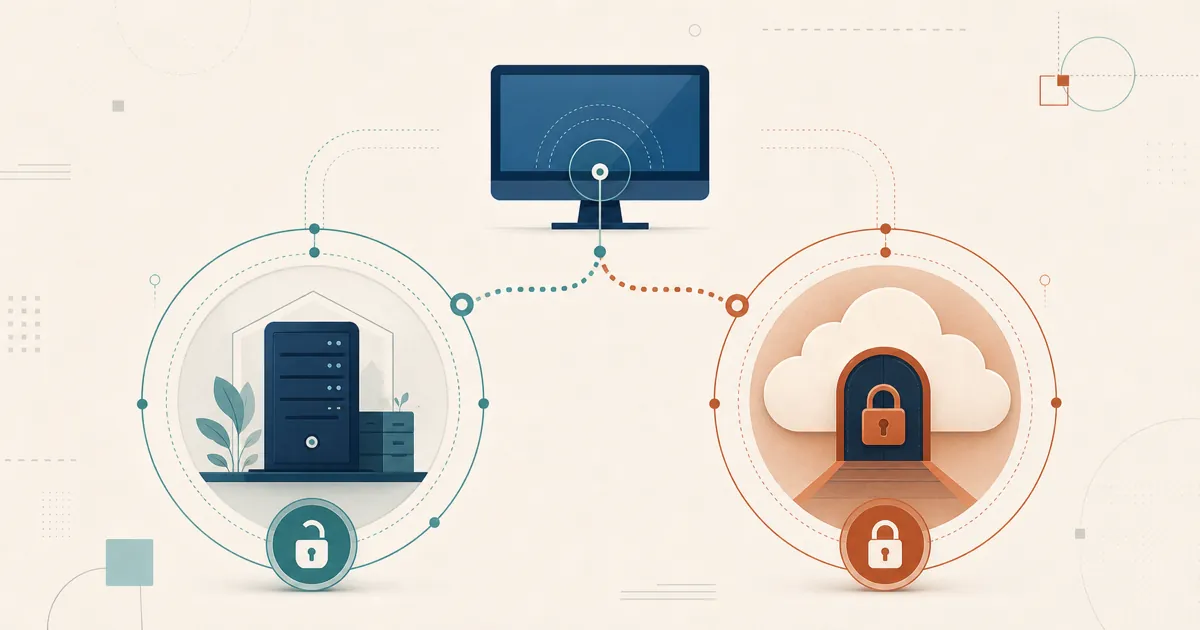
RustDesk and ScreenConnect both target the MSP remote-support workflow; the split is ownership — ScreenConnect is proprietary software licensed per concurrent technician, while RustDesk is open source and built to be self-hosted. This article relies on public product documentation rather than reproducing private customer emails, contract dates, or deployment details.
ScreenConnect (formerly ConnectWise Control) is a commercial remote-access platform with a large installed base in the MSP market. RustDesk is an open-source, self-hostable alternative built on a different philosophy — software you run and own yourself rather than a vendor-hosted service. Below is a section-by-section comparison of how they line up, and why MSPs move to RustDesk.
Contents
- Overview: RustDesk and ScreenConnect at a glance
- Feature comparison
- OS and platform support
- Security and identity
- Licensing and pricing models
- Pros and cons
- Why MSPs switch to RustDesk anyway
- Try RustDesk yourself
- Related reading
- Sources
Overview: RustDesk and ScreenConnect at a glance
ScreenConnect is ConnectWise’s remote-access and remote-support product, sold today under the ScreenConnect name (it spent several years branded as ConnectWise Control). It is aimed heavily at managed service providers and internal IT teams. You can run it as a managed cloud service on ConnectWise’s infrastructure, or license an on-premise edition you host yourself. It offers session recording, “Backstage” background administration, remote command line, remote printing, VoIP audio, and integration with the wider ConnectWise suite (PSA ticketing, Automate/RMM). If you already live in the ConnectWise world, ScreenConnect is designed to slot in.
RustDesk answers the same MSP need without the ecosystem lock-in. Its core client is open source under the AGPL, and Server Pro is self-hosted, so you operate the ID/rendezvous and relay services rather than renting technician capacity by the seat. Where ScreenConnect meters concurrent technicians, RustDesk standard plans include unlimited concurrent connections; only Customized V2 limits them. Custom client generation is available from the Basic plan and up — useful when the tool your clients see should carry your brand, not ConnectWise’s. The trade-off is that your team runs, patches, and secures the server.
In one line: ScreenConnect is a commercial platform with an MSP ecosystem around it; RustDesk is open-source, self-hosted software you own outright.
Feature comparison
The table below covers the everyday remote-support feature set. A note on method: for the ScreenConnect column, entries come from ConnectWise’s own feature and pricing pages as of our research in July 2026 (sources listed at the end). The RustDesk column reflects capabilities documented for the product. Check the current RustDesk documentation to confirm specifics for your build.
| Feature | RustDesk (self-hosted Server Pro) | ScreenConnect (ConnectWise Control) |
|---|---|---|
| Remote view and control | Yes — hosts on Windows, macOS, Linux, and Android; iOS is controller-only | Yes — multi-monitor remote support across all tiers |
| Unattended access to managed devices | Yes — managed devices via your self-hosted server, organized with device groups and a shared address book | Yes — unattended agents (10 on the entry tier; unlimited on higher tiers) |
| Mobile access | Android can control or be controlled; iOS is controller-only | Yes — iOS and Android technician apps; mobile guest client support on Standard and above |
| Session recording | Yes (can auto-record incoming/outgoing) | Yes — included from the Standard tier up |
| File transfer | Yes (both directions) | Yes — included across tiers |
| In-session chat | Yes — text chat | Yes — in-session chat |
| Remote printing | Yes — remote printer for incoming connections (Windows) | Yes — print from the remote machine to a local printer |
| Concurrent-connection limit | Unlimited on standard plans; limited on Customized V2 | Licensed per concurrent technician; see current tiers |
Concurrency drives both cost models. ScreenConnect licenses simultaneous technician capacity, while RustDesk standard plans are unlimited and Customized V2 licenses a defined concurrency allowance. See the RustDesk pricing page.
OS and platform support
Both tools are cross-platform, with one structural difference worth understanding: ScreenConnect distinguishes between the host side (the technician) and the guest side (the machine being supported), and platform support differs slightly between the two.
| Platform | RustDesk | ScreenConnect |
|---|---|---|
| Windows | Yes — x64, ARM64, 32-bit | Yes — host and guest (Windows 10/11, Server 2016–2025) |
| macOS | Yes — Apple Silicon & Intel | Yes — host and guest (current and previous two versions) |
| Linux | Yes — x86_64, ARM64 & ARM32; strong Wayland | Yes — host and guest (x86_64, glibc 2.17+) |
| Android | Yes — arm64, arm32, x64 (host & controller) | Guest support; Android technician app |
| iOS | Controller only | View-only guest screen sharing; iOS technician app |
| Control from a browser | Browser client for controlling (public web client, or self-hosted at a plan size); being controlled needs the native client | Yes — host via Chrome, Firefox, Safari, Edge |
A couple of clarifications so nobody is misled. ConnectWise’s own compatibility page, as of our research, lists Windows/macOS/Linux for host and guest plus iOS and Android mobile apps; some third-party write-ups also mention ChromeOS and Raspberry Pi clients, but we could not verify those on ConnectWise’s official page, so we’ve left them out. Separately, when teams talk about Raspberry Pi in a RustDesk evaluation, they usually mean self-hosting the RustDesk server on small hardware — that’s a server-side deployment story, not a client platform claim.
Security and identity
This section covers the security and compliance questions that usually drive the evaluation.
ScreenConnect’s security model. ConnectWise’s current pricing page lists AES-256 encryption, two-factor authentication, brute-force prevention, granular access management, and integrations with LDAP, SAML, OAuth, and other SSO providers. Its on-premise product page lists multi-factor authentication and role-based access controls and describes configurations intended to support SOC 2, PCI, CJIS, and HIPAA requirements. These are vendor claims rather than a conclusion that any deployment is automatically compliant; the first-party pages are linked in Sources.
Patching is an ownership question. With a vendor-hosted service the vendor controls the patch timeline; self-hosted operators update their own servers. Security patches, certificate rotations, and similar events land on your change calendar, not the vendor’s — the same ownership trade-off that keeps your data on your own infrastructure, and self-hosting RustDesk carries exactly this responsibility.
RustDesk’s security model. RustDesk’s approach is structurally different: because it is open source under the AGPL, the code can be independently audited and built from source rather than taken on trust — something neither ScreenConnect cloud nor its on-premise edition can offer. Server Pro is self-hosted, so the rendezvous/relay servers and session brokering stay on infrastructure you control, which is the whole point for teams whose driving concern is data residency and GDPR (why self-host covers the reasoning in depth). On identity, RustDesk supports LDAP and SSO via OIDC, and one point is worth stating plainly: LDAP/SSO is available from the Basic plan and up; plans below Basic do not include it. Administration runs through a self-hosted web console, with device groups and a shared address book to scope which technicians reach which machines. Setup specifics are in our RustDesk LDAP and Active Directory guide.
Being open source does not make software invulnerable. Review RustDesk’s latest releases and public vulnerability records. ScreenConnect cloud mode provides a vendor-operated service; RustDesk provides auditable code and self-hosted server-side services, along with operating responsibility. For the routing and residency boundaries, see Remote Desktop and Data Sovereignty.
Licensing and pricing models
Pricing changes often, so rather than treat any number as permanent fact, we’ll compare the two models and time-stamp the figures.
ScreenConnect packages technician/session capacity, unattended agents, and features by product and tier. Those details change, and on-premises terms require direct confirmation. Use ConnectWise’s current pricing page and a written quote for the same technicians, simultaneous sessions, unattended endpoints, security controls, and support requirements; this article does not preserve a price snapshot that will become stale.
RustDesk prices login users and managed devices. Standard plans include unlimited concurrent connections; Customized V2 adds a defined concurrency allowance. A straight sticker comparison is misleading, so size both products against actual user, device, concurrency, feature, and support requirements. Current RustDesk pricing lives at rustdesk.com/pricing.
Pros and cons
RustDesk
Pros
- Unlimited concurrent connections on standard plans — no per-technician session metering (only Customized V2 is limited)
- Custom-branded client generator ships a white-label tool under your name, not ConnectWise’s
- Self-hosted Server Pro keeps brokering/relay on infrastructure you own (data sovereignty, GDPR)
- Open source (AGPL) — auditable and buildable from source
- Free community server runs indefinitely at no cost
- Scales from a proof-of-concept box to large fleets (more on this below)
Cons
- You run, patch, and update the server yourself
- No fully free trial of Server Pro (email [email protected] for a test license)
- Some conveniences (LDAP/SSO) start at the Basic plan, not the entry tier
ScreenConnect
Pros
- Integration with the ConnectWise PSA/RMM ecosystem
- Managed cloud option with automatic patching
- Feature set including session recording, Backstage, VoIP, and diagnostics
- Large MSP install base — documentation and experienced technicians are easy to find
- Enterprise identity controls (2FA, SSO/SAML/OAuth, LDAP, and role-based access controls)
Cons
- Proprietary and closed-source — you can’t audit the code
- Concurrent-technician licensing meters your capacity
- Advanced features gated behind higher tiers; some functions are separate paid product lines
Why MSPs switch to RustDesk anyway
Everything above is the neutral comparison. Here’s the part where we’re openly making RustDesk’s case — because the requirements above are the ones that typically push MSPs to evaluate a self-hosted alternative in the first place. You can run the entire coordination layer yourself and keep session data inside your own perimeter — something a vendor-hosted tool structurally cannot offer. Server Pro lets you choose where ID, relay, console, and device data run. Direct endpoint traffic still crosses the networks between those endpoints, and compliance requires more than server placement. Many teams start by self-hosting on modest hardware to prove the concept, then validate capacity against their real concurrency and relay profile. For teams whose first concern is residency and control, that decides it.
If you’re evaluating specifically as an MSP, our RustDesk for MSPs piece is written for exactly your situation; enterprise buyers should start with RustDesk for Enterprise. See also Remote Desktop and Data Sovereignty and Can RustDesk Scale to 50,000+ Devices?.
Try RustDesk yourself
The no-pressure way to evaluate RustDesk is a representative proof of concept. Stand up the free community server and point a few endpoints at it — no cost, no sales call. For the Pro features, ask [email protected] about current evaluation terms or see rustdesk.com/pricing, and there’s a video walkthrough if you’d rather watch first.
Related reading
Sources
ScreenConnect product details were checked against these first-party ConnectWise pages on July 7, 2026. Features, platform support, packaging, and prices can change; verify the current pages and a written quote before purchasing.
- ScreenConnect pricing plans — current tiers, simultaneous-session limits, unattended agents, remote-support features, security controls, identity integrations, and ConnectWise integrations.
- ScreenConnect on-premise — self-hosting, Backstage, session recording, compatibility, security, and vendor-stated compliance capabilities.
- ScreenConnect host client requirements — technician-side operating-system requirements.
- ScreenConnect guest client requirements — supported-device operating-system requirements.
- ScreenConnect iOS app requirements — current iOS application requirements and manufacturer restrictions.
Frequently asked questions
Is RustDesk a self-hosted alternative to ScreenConnect?
Yes. RustDesk Server Pro runs the ID/rendezvous and relay services on infrastructure you control, and RustDesk is open source under the AGPL. ScreenConnect offers a managed cloud service and a self-hosted on-premise edition, both proprietary.
How does RustDesk pricing compare to ScreenConnect?
ScreenConnect licenses per concurrent technician/session; RustDesk licenses by login users and managed devices, with unlimited concurrency on standard plans (only Customized V2 meters it). Compare current written quotes for the same technicians, endpoints, and features.
Does RustDesk support SSO and LDAP like ScreenConnect?
RustDesk supports LDAP/Active Directory and OIDC SSO from the Basic plan and up. ScreenConnect lists LDAP, SAML, and OAuth SSO integrations; confirm the exact tier each product requires for identity.